How to Get Wedding Photos From Guests, and Share the Photographer’s Back: Six Options Compared

The easiest way to get wedding photos from guests is a shared album with a QR code on the tables: a Google Photos or iCloud album that anyone with the link can add to. It's free and needs no new app. Sharing the photographer's photos back with guests is a different job, and a selfie link does it better.
Most advice blurs the two jobs into one album. This post separates them, sets out six ways to handle wedding guest photos with a comparison table, and says plainly who should use which.
Disclosure: We make AccioPix, one of the six options. It delivers the photographer's photos to guests and does not collect guests' own photos. Facts about every other option come from its own help or pricing pages, read on 1 November 2026.

Five tests for a wedding guest photo app
A wedding guest photo app, or any method for gathering and sharing photos, can be judged on five tests. They come from the guest's side, because the guest is the one who gives up.
- Nothing new to install. A download on venue Wi-Fi loses people before they start.
- Full quality. The photos should survive being printed or cropped, not only viewed on a phone.
- The right people can add. Either every guest, for collecting, or only the photographer and their team, for delivery.
- Each guest can find their own. A grid of three thousand photos isn't the same as "your photos".
- It lasts. Guests come back weeks later, and the link should still work.
Six ways to collect and share wedding guest photos, side by side
The six ways to collect and share wedding guest photos split cleanly: five collect what guests shot, one gives guests what the photographer shot.
| New app for guests | Photo quality | Guests can add photos | Each guest finds their own | Cost | |
|---|---|---|---|---|---|
| Google Photos shared album | No, opens by link | Original, unless uploaded on Storage saver | Yes, with Collaborate on | No | Free; uses the uploader's Google storage |
| iCloud Shared Album (version 27) | No, joins on the web | Full resolution | Yes | No | Free; uses the owner's iCloud storage |
| WhatsApp group | No, already installed | Standard quality unless sent in HD | Yes | No | Free |
| Guest upload app (Kululu, POV) | No, scan or tap a link | Depends on the service | Yes | No | Free for small events, paid above |
| Wedding hashtag | Resized for Instagram | Only public posts | No | Free | |
| Selfie link (AccioPix) | No, opens in the browser | Full quality downloads | No; photographer and collaborators only | Yes, from one selfie | ₹0.20 per photo uploaded; free for guests |
Google Photos shared album: the free collector
A Google Photos shared album is the default way to collect wedding photos from guests, and for most couples it's enough. The setting that matters is Collaborate. Google's help page on shared album settings says "anyone who has the link to your shared album can add photos" when it's on, and adds: "You can't stop individual people from adding items, but you can stop everyone from adding items." An album holds up to 20,000 photos or videos, according to Google's album help page, which is more than any wedding produces.
Google built the QR code in for exactly this use. Album owners can "generate a QR code for easy album access with people nearby, or print it for group events," Shimrit Ben-Yair, Google's vice president for Google Photos and Google One, wrote when it launched in May 2025.
The limit is finding yourself. Everyone sees one long grid, guests' snaps and the photographer's edits together, and face grouping in Google Photos stays inside each person's own library. Our post on Google Photos shared albums for weddings covers the setup and the storage rules in detail.
iCloud Shared Album, now open to Android guests
An iCloud Shared Album stopped being an iPhone-only option with version 27 in September 2026. Apple's Shared Albums guide says friends and family "will be able to join and contribute their own photos on the web, even without an Apple Account or Apple device". Albums made on version 27 keep photos at full quality, and they count against the owner's iCloud storage.
The cap is people. Apple's limits page gives a "maximum number of participants in a shared album, including the owner" of 100. That covers the families and the wedding party, not a 300-guest reception. A temporary shared album avoids the storage cost: Apple's page on temporary albums says they hold up to 5,000 photos and videos, "don't use your iCloud storage", and "expire after 30 days". Save what you want before then.
The WhatsApp group, and what it does to photos
A WhatsApp group is where wedding photos go whether or not anyone plans it, because every guest already has the app. The cost is quality. When WhatsApp added HD photos in 2023, MacRumors reported that the HD button lets users "switch from the default Standard Quality to HD Quality". In 2024 9to5Mac noted that "Standard quality reduces photos taken with an iPhone to 960×1280 pixels". A guest who never opens the setting sends Standard.
The other cost is the scroll. Photos arrive mixed with jokes, voice notes and travel plans, and a week later nobody can find the one of their grandmother. Our guide to sharing photos on WhatsApp explains what HD mode and sending as a document keep. A group is good for the evening itself and poor as the place the photos live.
Guest upload apps and digital disposable cameras
Guest upload apps are services built to collect wedding photos from guests through a QR code, and the two below don't make guests install anything. Kululu's pricing FAQ answers the app question with "Nope, no apps needed." Its plans are sized by guests and photos: the Plus plan is pitched at events "up to 100 guests" where "no more than 500 photos will be shared", and uploads close when the event's "active time" ends.
POV turns the idea into a disposable camera. Its App Store listing says guests "can scan a code or tap on a link and don't have to download this app to participate", that "you determine how many photos each of your guests can take", and that "the gallery can reveal during the event or you can make people wait until the next day". The cap on shots is deliberate, like the frames on a film camera.
These services do collection well and add moderation, slideshows and live walls that a shared album lacks. What they collect is still one shared pile, with no way for a guest to pull out their own photos.
The wedding hashtag: discovery, not an archive
A wedding hashtag gathers only what guests post publicly on Instagram. A guest with a private account, or one who never posts, is missing from it, and what does appear is sized for a feed, not a print. It's a nice way to see the day through other people's eyes on the night. It isn't a way to keep the photos, and it does nothing for the photographer's.
A selfie link for the photographer's photos
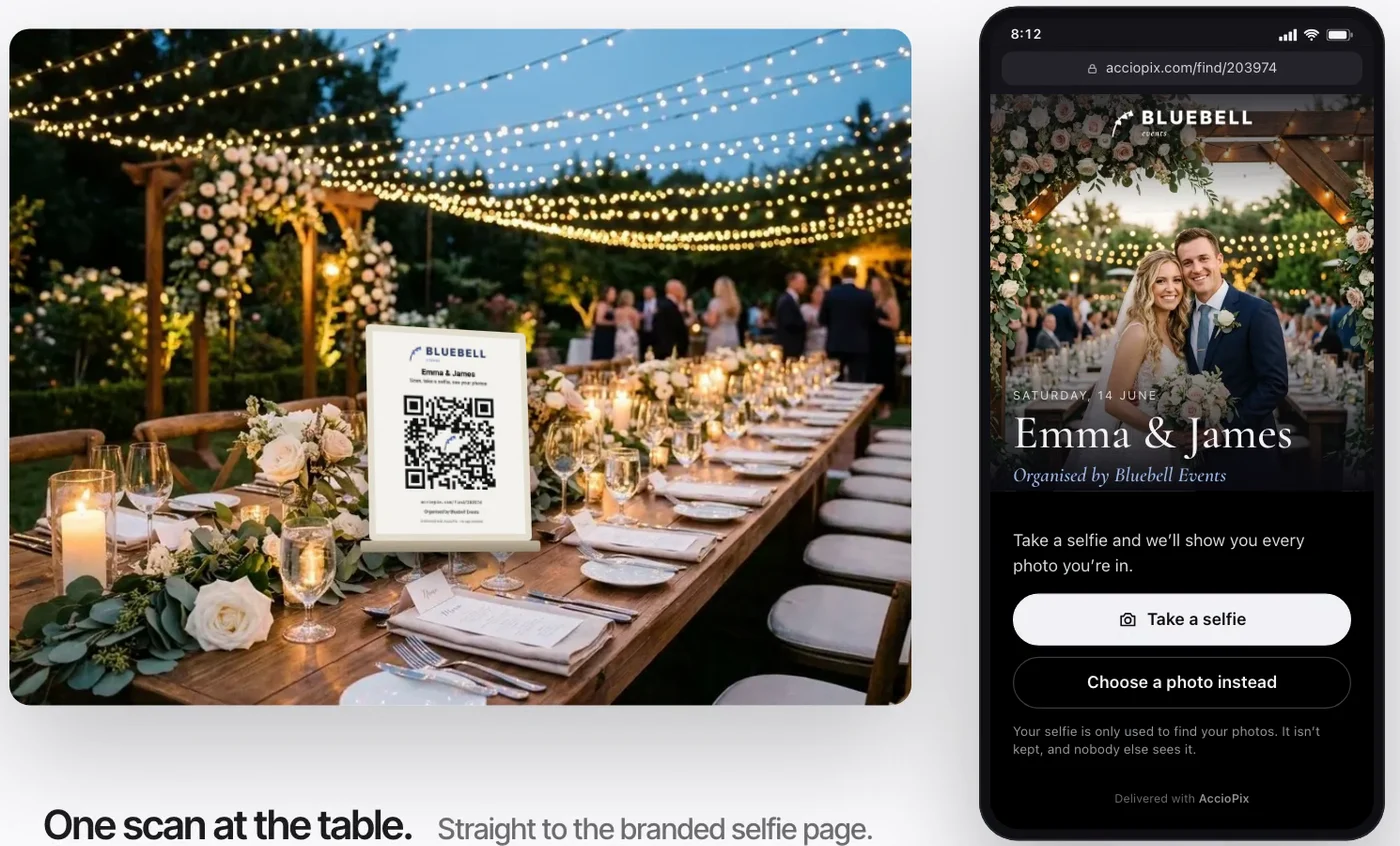
A selfie link solves the other half: giving each guest the photographer's photos they appear in. With AccioPix the photographer uploads the gallery once and shares one link or a printed wedding QR code. A guest opens it, takes a selfie in the browser, and sees every photo they're in, ready to download at full quality. A second card opens WhatsApp instead, for families who'd rather get the photos in a chat.
The selfie is used to find the guest's photos and isn't stored. It's compared only with the faces in that wedding's photos, never across events, and nothing is matched until the guest sends one. Face data from the event photos stays with the album and is deleted when the host deletes the photo, the event or the account.
Guests can't upload to it. Only the photographer can, along with anyone they invite as a collaborator, such as a second shooter or the cousin with a good camera; collaborators upload on the host's credits. For the guests' own phone shots, run a free shared album alongside it.
The price is per photo uploaded: ₹0.20 per photo, so a 2,500-photo wedding costs about ₹500. Guests pay nothing, and a new account's first 20 credits, enough for 100 photos, are free. For photographers, it ends the weeks of "can you send me the ones I'm in?" messages, and the album carries the studio's name. The wedding photo sharing page shows the guest's side, and pricing has the rest.
Good fits for a selfie link, and poor ones

A selfie link is worth it when the gallery is big and the guest list is long. It is a waste when everyone is in every photo anyway.
It's for:
- Weddings with a hired photographer and more than a few hundred photos.
- Guest lists in the hundreds, where most people appear in a small share of the gallery.
- Families who live on WhatsApp and won't open a gallery site.
- Photographers who'd rather not answer "where are my photos?" for a month.
Skip it if:
- The wedding is small, 30 people or so, and a shared album with everyone's photos is easier.
- What you want is the guests' own phone photos. A selfie link doesn't collect them; a shared album or an upload app does.
- There's no photographer and the only photos are the guests'.
For most weddings the answer is both: a free shared album with its QR code for the guests' candids, and a selfie link for the photographer's gallery. Print them on separate cards and say on each what it does. Our guide to the wedding QR code for photos covers making, sizing and placing the cards.
Frequently asked questions
How do I get wedding photos from guests?
Make a shared album before the wedding, switch on adding, and print its QR code on the tables. A Google Photos album with Collaborate on, or an iCloud Shared Album made on version 27, lets guests add photos without installing anything new. Ask once more in the thank-you message, because many guests only remember after the day.
What is the best wedding guest photo app?
It depends on the direction. To collect guests' phone photos, a free shared album or an upload service such as Kululu or POV works, and neither needs guests to install an app. To give guests the photographer's photos, a selfie link such as AccioPix shows each guest only the photos they're in.
How do I share wedding photos with guests?
Share one link or a QR card rather than sending files one by one. A shared album works for a small wedding where everyone is in most photos. For a larger one, a selfie link lets each guest see only the photos they appear in, and download them at full quality, without scrolling the whole gallery.
Can guests upload photos to AccioPix?
No. AccioPix delivers the photographer's photos to guests; it doesn't collect guests' phone photos. The photographer, and any second shooter or friend with a good camera they invite as a collaborator, can upload to the event. For guests' own shots, use a free shared album alongside it.
Do wedding guests need to download an app?
Not for most options any more. Google Photos and iCloud albums open on the web, upload services like Kululu and POV work from a scan or a link, and a selfie link opens in the phone's browser. WhatsApp needs no download because almost every guest already has it, but it shrinks photos unless they're sent in HD.
References
- Apple, How to use Shared Albums in Photos on your iPhone, iPad, or Apple Vision Pro, Apple Support. Read 1 November 2026.
- Apple, Shared Albums limits, Apple Support. Read 1 November 2026.
- Apple, Create a temporary shared album on iPhone, iPad, Mac, or Apple Vision Pro, Apple Support. Read 1 November 2026.
- Ben-Yair, S., 2025. 10 tips for 10 years of Google Photos. The Keyword (Google), 28 May 2025.
- Espósito, F., 2024. WhatsApp users can now set HD quality as default for sending photos and videos. 9to5Mac, 18 June 2024.
- Google, Stop sharing an album & manage settings, Google Photos Help. Read 1 November 2026.
- Google, Create & edit photo albums, Google Photos Help. Read 1 November 2026.
- Hardwick, T., 2023. WhatsApp gets 'HD Photos' option for sending high-res images. MacRumors, 18 August 2023.
- Kululu, Pricing and FAQ. Read 1 November 2026.
- POV, POV – Disposable Camera Events, App Store listing. Read 1 November 2026.
Sign in with Google and your first 20 credits are free, enough for 100 photos, with no card to enter. Upload the gallery, print the QR card, and guests find their own photos.
AccioPix
← Back to Blog