Wedding QR Code for Photos: How to Make One, Where to Put It, and What Guests See

A QR code for wedding photos is a printed code that opens the wedding's photos on a guest's phone. The useful kind opens a selfie page: the guest scans, takes one selfie and sees only the photos they're in. Make it from the album's link, print it at least 5 cm wide, and put it where guests stand and wait.
Many wedding QR code products sell the opposite: a code guests scan to upload their own phone photos. Both have a place. This guide covers the delivery kind step by step, says where the upload kind fits, and ends with the mistakes that leave a printed code leading nowhere. The card itself, and what it costs, are on the wedding QR code page.
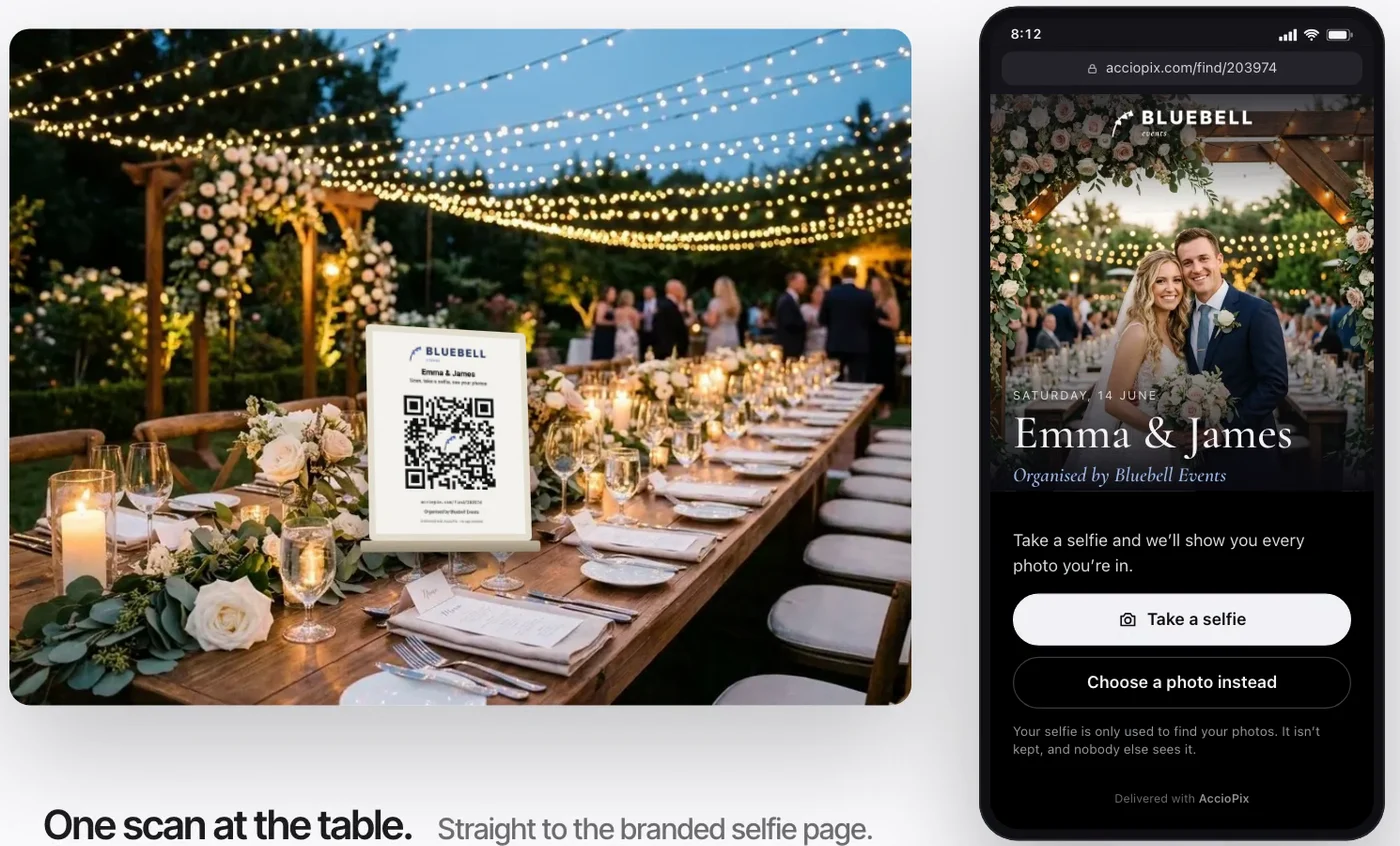
Two kinds of wedding photo QR code
A wedding photo QR code does one of two jobs, and the job decides where it should point.
The first is collection. The code opens an upload page or a shared album, and guests add the photos on their phones: the dance floor, the table selfies, the shots the photographer was too busy to take. Services built for this ask little of guests. Kululu's pricing FAQ answers the app question with "Nope, no apps needed." Google Photos added the same thing to shared albums in 2025. "Starting to roll out now, you can generate a QR code for easy album access with people nearby, or print it for group events," wrote Shimrit Ben-Yair, Google's vice president for Google Photos and Google One, in 10 tips for 10 years of Google Photos.

The second is delivery. The code opens the photographer's photos. A plain gallery link does that, but it hands every guest the whole wedding, and a guest who is in forty frames of three thousand has to scroll for them. A selfie page sorts the gallery for each guest. That is the kind this guide is about, and the kind the AccioPix wedding QR card opens.
Plenty of couples want both. That's fine, as long as they are two cards with different words on them. Our guide to collecting wedding guest photos compares the upload options side by side.
Making a wedding QR code for photos in seven steps
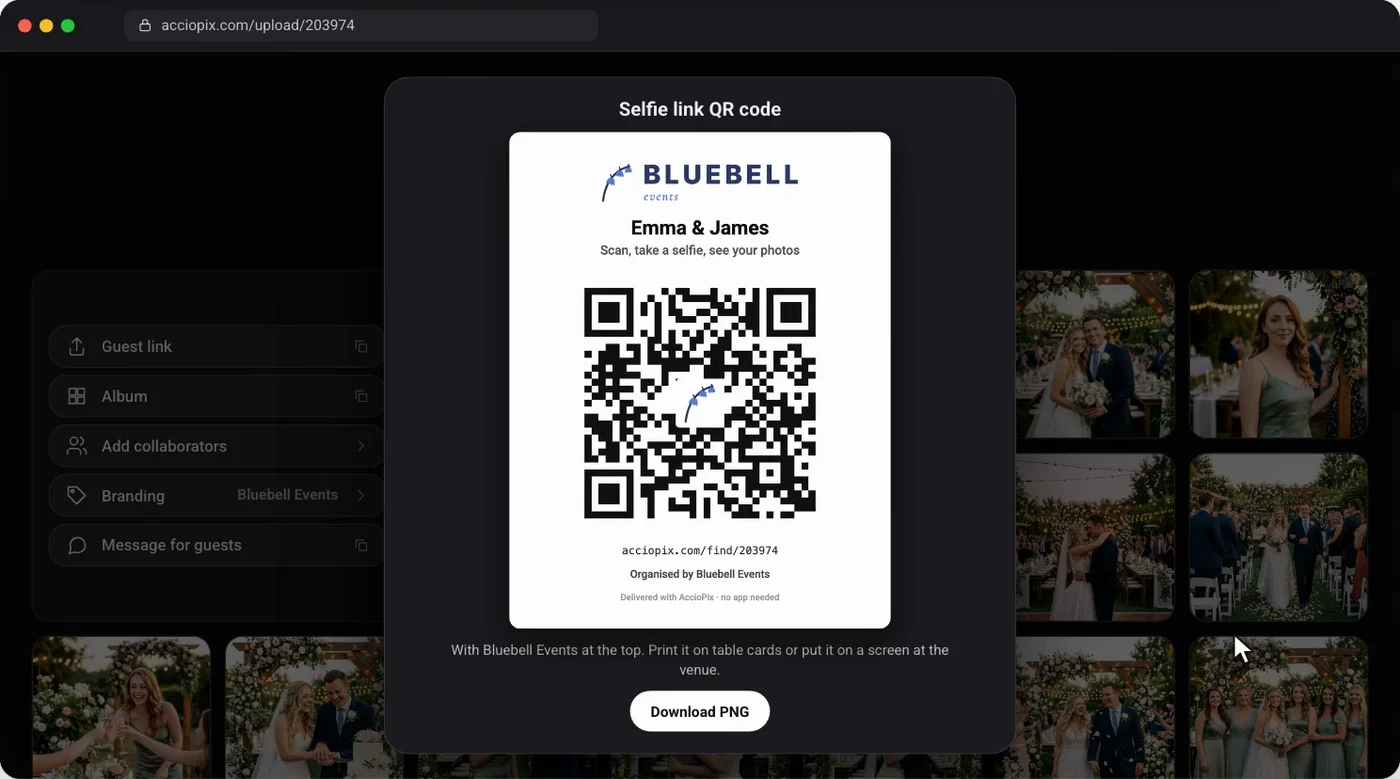
Making a wedding QR code for photos takes about ten minutes once the event exists. These steps use AccioPix, where the card is built in. Steps 5 to 7 work for any link and any generator.
- Create the event. Sign in with Google and create an event with the couple's names. The guest link exists from that moment, so the card can go to the printer before the wedding.
- Add the branding. Set up Your brand once and every card carries the photographer's or planner's logo on top and their mark in the middle of the code. Without a brand, the card shows the AccioPix logo.
- Open Share with guests. On the dashboard or the upload page, open Share with guests. It holds two links: the selfie link, which opens in any phone browser, and the WhatsApp link, which opens a chat.
- Tap QR next to the selfie link. The card appears in the dialog with the couple's names, the code, and the link spelled out underneath for anyone whose camera won't read it. Most couples print the selfie card; families who live on WhatsApp like the second one.
- Download the card. It comes as a 1,200-pixel PNG, sharp up to A5. For a large welcome sign, paste the selfie link into the free QR code generator with logo and download the large size or an SVG.
- Test it on two phones. Print one proof. Scan it with an iPhone and an Android phone from where a seated guest would hold it, and read the address the phone offers before you tap it.
- Print the cards, then upload the photos. Put the cards out on the day. Upload during the reception or after it. A guest who scans before the photos are in is told to try again later.
On step 6, the US Federal Trade Commission's consumer alert on QR codes gives the habit in one line: "If you see a QR code in an unexpected place, inspect the URL before you open it." Your guests will do the same, so the address they see should be the album's own link and not a stranger's short domain.
For a code to anything else, such as the RSVP page, the wedding website or the menu, the free QR code generator with logo makes the same kind of card from any link. It needs no sign-up, adds no watermark, and runs in the browser.
QR code placement and size at a wedding

The best place for a QR code at a wedding is anywhere guests stand still with a hand free. Size follows distance. QR Planet's help page on minimum size puts "the ratio between scanning distance and the QR Code size" at 10:1, and recommends at least 20 by 20 mm for a code scanned from 20 cm. A wedding card is read from further away than a business card, so allow more.
- Table cards. One per table, read from about half a metre, so at least 5 cm wide. Guests scan it between courses.
- The welcome sign or seating chart. Read from a step or two away, so 15 to 20 cm.
- The bar, the photo booth and the dessert table. Guests queue there with phones already out.
- The venue screen. Show the code after the speeches, when someone can say what it does. A projected code is read from across the room, so fill the screen.
- Thank-you cards. For the relatives who left early, and for anyone who wants the photos again a month later.
The code also needs room to breathe. DENSO WAVE, which invented the QR code, says on its page on the code area that a code "requires a four-module wide margin at all sides of a symbol", a margin it describes as "a clear area around a symbol where nothing is printed". A designer who runs the floral border right up to the squares has made a code some phones won't read. Print dark on light, on matte card rather than gloss, which throws back the string lights.
The guest's side of the scan
After the scan, a guest sees the couple's selfie page, with the photographer's or planner's logo, and one button. No app opens and nothing asks for an account. On an iPhone the camera reads the code directly; Apple's support page on scanning QR codes says to open the Camera app and "hold your device so that the QR code appears, then tap the link to open the content". Most Android phones do the same from the camera or Google Lens.
The guest takes a selfie in the browser, and the page shows every photo they appear in, ready to download at full quality. A guest who scanned the WhatsApp card gets a chat instead: they send the selfie there, the best photos arrive in the chat, and a link carries the rest.
Four rules sit behind that selfie. It is used to find the guest's photos and is not stored. It is compared only with the faces in that one wedding's photos. Nothing is matched until the guest chooses to send one. And the face data from the event photos stays with the album, deleted when the host deletes the photo, the event or the account.
Timing matters too. A guest who scans before the photographer has uploaded anything is told to come back later and take another selfie. The wedding photo sharing page shows the full guest journey, including the photographer's upload during the reception.
Free wedding QR codes, and the expiry trap
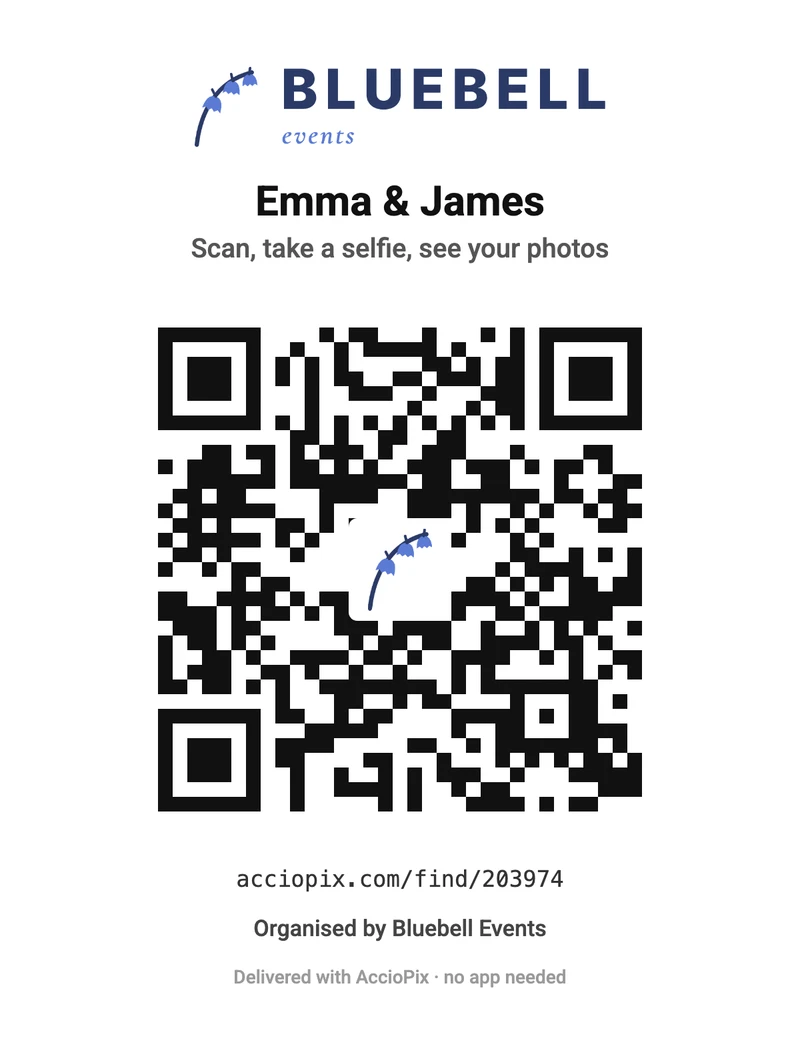
A free QR code for wedding photos is easy to get. A free one that still works in three months needs a moment's checking. A static code holds the link in its pattern and never expires. A dynamic code holds a short link on the provider's server, which can switch it off when a trial or plan ends. Our explainer on whether QR codes expire quotes six generators' own terms on this.
A logo in the middle is safe on a static code because of error correction. DENSO WAVE's summary of the QR code standard lists four levels. Of the highest, H, it says: "Approx. 30% of codewords can be restored." The free generator and the event card both use level H and keep the logo small, on a white tile.
On AccioPix the card is free with every event. What you pay for is the photos uploaded: ₹0.20 per photo, so a 2,500-photo wedding comes to about ₹500, and a new account's first 20 credits, enough for 100 photos, are free. Guests pay nothing. The album stays up for a year and can be extended; the details are under pricing.
For the photographer, the card is the delivery step. Upload once, the cards go on the tables, and guests find their own photos instead of messaging you for them in the weeks after. Your logo sits on every card, which puts the studio's name in front of every guest who scans.
Five mistakes that break a wedding QR code
- A dynamic code on a free trial. It works at the wedding and stops a fortnight later, when guests come back for the photos. Use a static code, or a service that keeps the link up for as long as the album.
- A code that points at the whole gallery, or an app store. A guest who has to scroll three thousand photos, or install something first, often gives up. Point it at a page that does the work.
- A code that's too small or too pretty. Gold foil, low contrast, a photo behind the squares, a border that eats the margin. Each one costs scans, and a guest with an older phone gets nothing.
- A hundred cards printed before one was tested. Scan a proof with two phones, at table distance, under the venue's light if you can.
- A bare code with no words. A code alone is a puzzle. Say what happens, in one line: "Scan, take a selfie, see your photos." If you also have an upload code for guests' own shots, say that on its card, so nobody scans the wrong one.
Frequently asked questions
How do I make a QR code for wedding photos?
Copy the link to the page guests should open, paste it into a QR code generator, and download the code as a PNG or SVG. Use a static generator so the code never expires. If the photos are on AccioPix, the card is already made: open Share with guests, tap QR next to the selfie link and download it.
Can guests upload photos with a wedding QR code?
Yes, if the code opens an upload page or a shared album that lets guests add photos, such as a Google Photos album with Collaborate switched on. That code collects the guests' phone shots. It doesn't give anyone the photographer's photos, so many couples print a second card for those, with different words on it.
Is a wedding QR code free?
A static QR code is free from any generator and never expires. Dynamic codes usually need a paid plan once the trial ends. On AccioPix the printable card comes with every event at no charge; you pay ₹0.20 per photo uploaded, and guests pay nothing.
What size should a wedding QR code be?
Make it about a tenth of the distance it will be scanned from. On a table card read from 50 cm, that's at least 5 cm wide. On a welcome sign read from a step or two away, 15 to 20 cm. Keep a plain white margin around the code and test a printed proof first.
Do wedding QR codes expire?
A static code never expires, but it only works while the page it points to exists. A dynamic code stops when the provider's plan or trial ends. An AccioPix card holds the event's own link, and the album is hosted for a year and can be extended.
References
- Apple, Scan a QR code with your iPhone or iPad, Apple Support. Read 1 November 2026.
- Ben-Yair, S., 2025. 10 tips for 10 years of Google Photos. The Keyword (Google), 28 May 2025.
- DENSO WAVE, Point for determining the code area, QRcode.com. Read 1 November 2026.
- DENSO WAVE, QR Code standardization, QRcode.com. Read 1 November 2026.
- Kululu, Pricing and FAQ. Read 1 November 2026.
- Puig, A., 2023. Scammers hide harmful links in QR codes to steal your information. Federal Trade Commission consumer alert, 6 December 2023.
- QR Planet, What is the minimum size of a QR Code?, QR Planet Help. Read 1 November 2026.
Sign in with Google, create the event, and the card is ready to print. Your first 20 credits are free, enough for 100 photos, with no card to enter.
AccioPix
← Back to Blog